
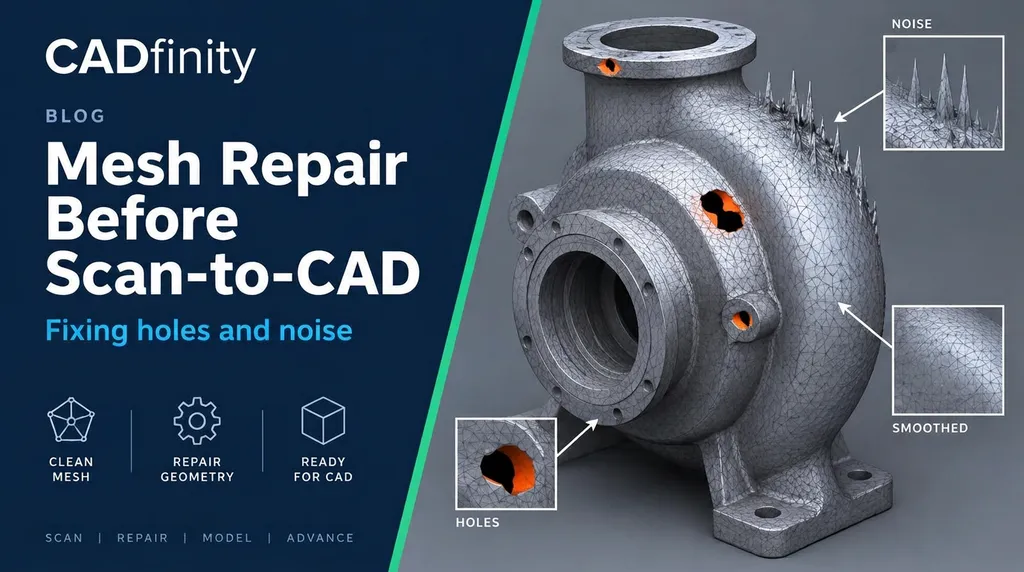
Raw scans carry floating islands, spikes, overlapping shells and holes where the scanner couldn't see. Feed that into Design X or SOLIDWORKS and region detection fails, fits wander and you lose hours. Ten minutes of mesh repair first saves that time — if you do it in the right order.
§ The repair order we use
- Delete floating islands and the scan table / fixture.
- Remove noise spikes and outliers (filter by distance from the main shell).
- Fix defects: non-manifold edges, self-intersections, folded or tiny triangles.
- Fill holes — curvature-based for smooth areas, flat for planar ones.
- Smooth lightly, only where needed.
- Decimate to a workable size, keeping detail on edges.
- Check: closed shell, no defects, deviation vs. the raw scan.
§ Filling holes the right way
Small holes on a flat or gently curved face are safe to fill automatically. Large holes over edges, fillets or holes-that-are-really-holes need care: fill them with the surrounding shape in mind, or leave them open — in scan-to-CAD you model the feature from the good data around it anyway.
§ Smoothing without losing accuracy
Global smoothing rounds sharp edges and shrinks the part. Smooth only noisy regions, use low strength and few iterations, and compare deviation to the original — stay well inside your tolerance (for machined parts, under ~0.02 mm).
| Software | Good for | Cost |
|---|---|---|
| Geomagic Design X | Full healing wizard, then scan-to-CAD in the same file | Paid |
| EXScan / Revo Scan | Basic cleanup straight from the scanner | Included with scanner |
| Meshmixer | Islands, hole fill, inspector | Free |
| MeshLab | Filters, outlier removal, decimation | Free |
| Blender (3D Print Toolbox) | Non-manifold checks | Free |
Was this helpful?
Take it further
Have a part like this? Or want to learn the workflow yourself?